


LOW STOCK
reMarkable Paper Pro Bundle - Risk-Free Trial
reMarkable Paper Pro Bundle - Risk-Free Trial
Couldn't load pickup availability
-
SSL-Secure
-
Easy 30-day returns
-
Free delivery over $45

reMarkable Paper Pro Bundle - Risk-Free Trial
Shipping & Warranty
Shipping & Warranty
Order processing takes 1-3 business days before shipment. Once your item/s is dispatched, the estimated delivery time is:
- USA: 5-7 business days
- UK: 5-7 business days
- Australia: 5-7 business days
- Canada: 5-7 business days
- Europe: 7-10 business days
- Rest of world: 7-10 business days
All orders placed on Oupal are limited to a 30 day money back guarantee. If you wish to return your product within this time period please contact support@oupalstore.com
Returns & Exchange
Returns & Exchange
Changed your mind? No problem at all!
We provide a 30-day hassle-free return policy. Simply reach out to our friendly customer service team to request a return form.
Once we receive your returned item, a full refund is on its way to you. Your satisfaction is our top priority!
How does the trial work?
How does the trial work?
Simple and straightforward:
Trial Process:
- Pay $4.95 to start: Get the complete reMarkable Paper Pro Bundle delivered—includes the tablet, Marker Plus pen with eraser, 6 spare tips, and USB-C cable
- Test it for 14 days: Use it for notes, reading, sketching, PDF editing—whatever you'd actually use it for in real life
- Keep it or return it: Love the paper-like experience? Keep it. Not convinced? Return it for a full refund
What you're testing:
- Does the writing feel actually feel like paper?
- Is the color e-ink display worth it for your workflow?
- Can you read comfortably without eye strain?
- Does it replace your notebooks, PDFs, and tablets?
Why $4.95? At the regular price point, we know it's an investment. Rather than trust marketing claims about "paper-like writing," test it yourself with your own handwriting, your own PDFs, your own use case. If it doesn't deliver, send it back—no questions asked.
Does it really feel like writing on paper, or is that just marketing hype?
Does it really feel like writing on paper, or is that just marketing hype?
It actually does—and here's why:
The technology behind it:
- Canvas Color e-ink display (not LCD or LED screens)
- The Marker Plus pen creates realistic friction against the display surface
- 21ms latency—your writing appears instantly, no lag
- Pressure sensitivity responds to how hard you press, just like pen on paper
What makes it different from iPads/tablets:
- No slippery glass feeling
- No screen glare bouncing into your eyes
- No need for a matte screen protector that wears out
- Actual texture that mimics paper grain
Can I read PDFs and ebooks on this? How does it compare to a Kindle or iPad?
Can I read PDFs and ebooks on this? How does it compare to a Kindle or iPad?
Yes—and it's designed specifically for reading without eye strain.
Reading features:
- 11.8" display (larger than most Kindles and readable for full-page PDFs)
- Low-glare e-ink reflects natural light like paper—no blue light fatigue
- Adjustable reading light for nighttime use
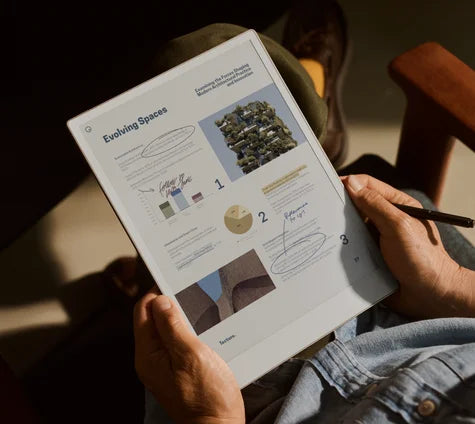
- You can annotate directly on PDFs with the pen (perfect for contracts, reports, research papers)
vs. Kindle:
- Larger screen for PDFs and documents
- Can write notes directly on what you're reading
- Color display (Kindle is mostly black and white)
vs. iPad:
- No eye strain from backlit screens
- Battery lasts weeks, not hours
- Readable in direct sunlight
- Zero distractions (no apps, no notifications, no internet rabbit holes)
Best for: People who read and mark up PDFs for work, students reviewing research papers, anyone who spends hours reading and takes their eyes feel fried afterward.
What can I actually do with this? Is it just for notes, or are there other uses?
What can I actually do with this? Is it just for notes, or are there other uses?
It's built for focus work—notes, reading, and document editing.
Primary uses:
- Digital notebook: Replace paper notebooks with organized, searchable notes
- PDF annotation: Mark up contracts, reports, research papers, ebooks
- Sketching/drawing: Artists use it for drafts and digital sketches
- Handwriting-to-text conversion: Write by hand, convert to typed text instantly
- Meeting notes: Take notes during calls, sync them across devices afterward
- Reading: Books, articles, documents—all without screen fatigue
Organization features:
- Folders and tags to sort everything
- Search your handwritten notes (yes, it reads your handwriting)
- Sync across desktop, laptop, smartphone, tablet
- Export notes as PDFs or text files
Trial it: If your work involves reading documents, taking notes, or annotating PDFs daily, this will likely change how you work. If you mostly need entertainment or web browsing, an iPad makes more sense. Test it during the trial to find out.
The only tablet that actually feels like paper—now in color.
The reMarkable Paper Pro is a digital notebook that writes, sketches, and reads like real paper, but without the clutter. 11.8" Canvas Color display with adjustable reading light, ultra-slim design, and zero eye strain even in direct sunlight.
What's included:
- reMarkable Paper Pro tablet (11.8" color e-ink display)
- Marker Plus pen with built-in eraser
- 6 spare marker tips
- USB-C charging cable
Risk-Free Trial Offer
Test it in your own workflow.
Try the reMarkable Paper Pro bundle risk-free. If the writing experience doesn't live up to the hype or it doesn't fit your workflow, return it. Simple as that.


-

Color Changes Everything
You can finally highlight in yellow, sketch in multiple colors, and actually see documents the way they were meant to be viewed. The 11.8" Canvas Color e-ink screen displays full color without the eye strain of backlit tablets.
-

As Close to Paper as Possible
Most tablets feel like writing on glass—slippery, unnatural, disconnected. The reMarkable Paper Pro uses a textured e-ink display that creates actual friction when you write. Your pen doesn't slide around. It grips the surface just like pen on paper.
-

Work Anytime, Anywhere
The low-glare e-ink display reflects natural light just like paper. No screen glare, no squinting, no eye fatigue. You can work outside on a sunny day, by a window, or under bright lights without the headaches that come from staring at backlit screens.
-

Everything Syncs Automatically
Take notes on your reMarkable tablet during a meeting. Pull them up on your phone on the train ride home. Review and edit them on your laptop later that evening. Everything stays in sync across all your devices—desktop, laptop, smartphone, and tablet.
-

The Marker Plus: Engineered for Precision
The included Marker Plus was designed exclusively for the reMarkable Paper Pro. It's not a generic stylus adapted to work with a screen. Every detail—weight, balance, tip friction, pressure sensitivity—was engineered to deliver that natural pen-on-paper feel.


